Back to Maintenance Manager for Manufacturing Main Menu
View or Update an Inventory Item
The View/Edit Item Details feature allows Administrator and Technician to review and update inventory item details and stock information.
To edit or update an item:
-
Click the three vertical dots at the right corner of the Item name.
-
Select View/Edit Item Details.

A pop-up page appears. -
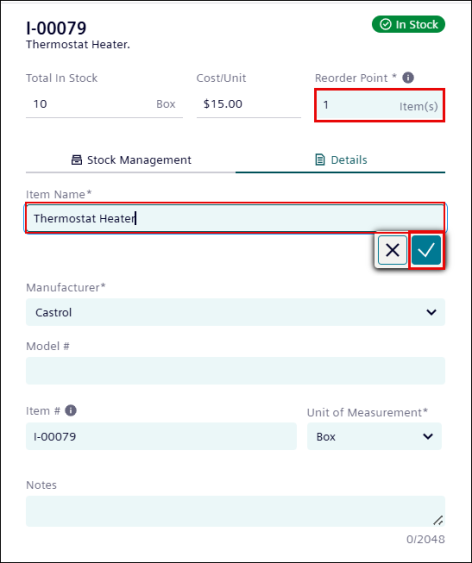
Under Details tab, enter an item in Reorder Point.
NOTE The Reorder Point field cannot be left blank.
-
Click on a field to update it, as required.
-
Click
 .
. -
Additionally, update other fields also, as required:
-
Manufacturer
-
Model#
-
Item #
-
Unit of Measurement
-
Notes
-
-
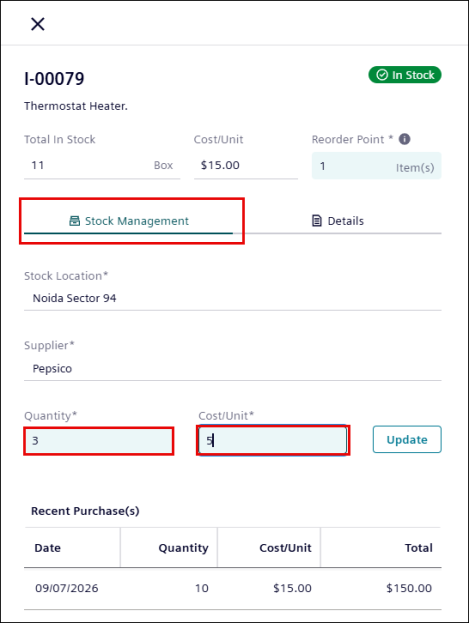
Click the Stock Management tab and enter Quantity and Cost/Unit, if required.
NOTE The following are read-only cannot be modified:
*Stock Location
*Supplier
*Total in Stock
-
Click Update.
The inventory item is updated successfully.